


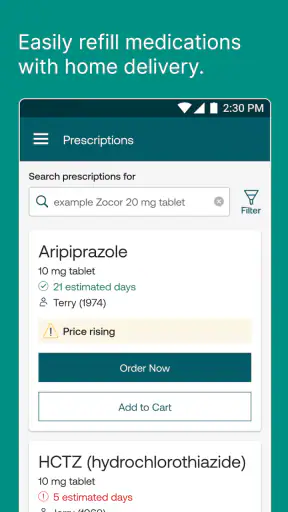
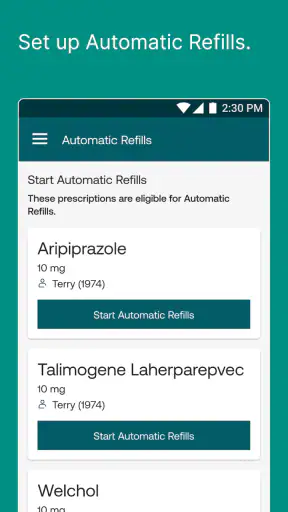
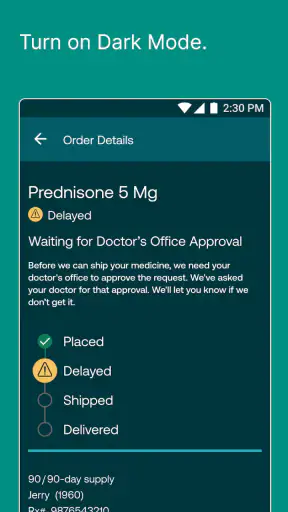
Managing prescriptions is one of those jobs that seems simple until a refill is late, a pharmacy has changed, or you need to check coverage while away from home. I spent time with Express Scripts as a medical app from Express Scripts, Inc., and my impression is that its value comes less from novelty than from putting pharmacy-care tasks in one place. It is free, rated for Everyone, and aimed at people who already use Express Scripts for their prescription needs.
The app has been around since 2011, so it does not feel like a brand-new experiment. Its current version is 14.0.1, and it requires iOS or Android 12 or later. That operating-system requirement is worth checking before troubleshooting anything else: an installation problem can be caused by the phone rather than the app itself. With more than a million installs, a 4.7 average from roughly forty-one thousand ratings, and about sixteen thousand written reviews, it has clearly become a familiar tool for many members.
Where people usually get stuck
The first hurdle is often not finding the app but getting past the account stage. Express Scripts is tied to pharmacy-care information, so a user should expect the sign-in process to matter more than it would in a basic reminder app. If your account details, member information, or password do not match what Express Scripts has on file, repeatedly reinstalling the app is unlikely to solve the problem. I would start by checking the spelling of the account information, using the official recovery route, and making sure the keyboard has not inserted an unwanted space.
A second common point of friction is assuming that every prescription will appear immediately after installation. The app is designed to manage an existing pharmacy relationship, not to replace the enrollment or coverage arrangements behind that relationship. If the account opens but the medication information looks incomplete, I would first confirm that I signed in with the correct member account rather than treating the missing item as an app failure.
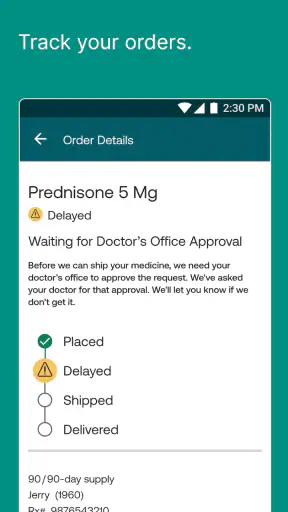
It is also easy to confuse a pharmacy-care issue with a technical issue. A prescription may require attention from the pharmacy, the prescriber, or the coverage administrator. In that situation, the app can be a useful place to review what is happening, but it cannot independently change a prescription that needs authorization or correct information held elsewhere. That distinction saves time: use the app to inspect the status and available actions, then contact the appropriate healthcare or pharmacy source when the next step depends on them.
Another small but important issue is timing. A prescription workflow may involve several parties, and the information shown in an account may not change at the exact moment a pharmacy receives a request. I found it more sensible to check the status, note what action is requested, and avoid submitting the same request repeatedly. Duplicating actions can make an already confusing situation harder to follow.
What I check before blaming the app
When the app refuses to load or a page remains blank, I use a short order of checks. First, I confirm that the phone is running at least Android or iOS 12. Next, I switch between a reliable Wi-Fi connection and mobile data, because a weak connection can look like a failed account page. I then close and reopen the app, and only after that consider updating it or reinstalling it.
Reinstallation should not be the first response to every problem. It can clear local glitches, but it does not repair an incorrect account detail or a prescription issue held by the pharmacy. Before removing the app, I make sure I know the sign-in information and can access the relevant account-recovery method. Otherwise, a quick technical experiment can turn into a longer access problem.
Notifications deserve a practical check as well. If I am relying on a reminder or status change, I look at the phone's notification settings and battery restrictions rather than assuming the app has failed. I also open the app directly when something is time-sensitive. A notification is convenient, but it should not be the only way I verify an important prescription update.
Setting it up for a calmer prescription routine
My preferred setup is to install the app before I urgently need a refill. That gives me time to sign in, inspect the account, and understand where prescription information appears without a deadline hanging over me. I would also keep the phone's operating system current enough for the app's minimum requirement and leave enough storage for normal updates.
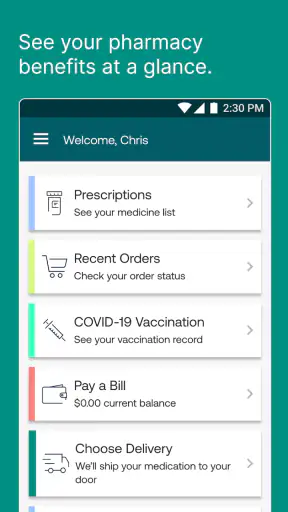
After signing in, I would review the medication information carefully instead of assuming that the first screen tells the whole story. Look for the prescription you actually need, check its current status, and read the available instructions before taking action. This is especially useful for someone managing several medications, because choosing the wrong item can create unnecessary confusion even when the app is working normally.
A useful habit is to record the date on which you begin a refill workflow and what the app says at that moment. I do not mean keeping sensitive health information in an unsecured note; a simple personal reminder such as “check status again” can be enough. If the status later seems unchanged, you have a clearer reference point when speaking with support or a pharmacy representative.
I would also avoid setting up the app on a shared phone without thinking about privacy. The age rating is Everyone, but that rating describes suitability, not the sensitivity of prescription information. Use the phone's own security features, sign out when appropriate, and be cautious about showing account screens in public. A medical app deserves the same care as a banking app when other people can access the device.
For families or caregivers, the important question is not simply whether the app can be installed on another person's phone. The account relationship and permission to view or manage prescription information must be handled correctly. I would not share a password casually or assume that a family member should use the patient's login. When access involves another person, use the account process intended for that relationship or contact Express Scripts directly for guidance.
Recovering when a request seems to stall
When a refill or pharmacy-care action appears stuck, I take a screenshot only if it can be done without exposing private information to anyone else, then write down the exact wording shown on screen. I close the app, reopen it, and check whether the status has changed. If the same message remains, I avoid tapping the same action over and over. Instead, I check whether the prescription needs a different next step, such as contacting a pharmacy or prescriber.
This is where the app is most useful as a central reference. It can help me see whether the issue is associated with the prescription account, while the pharmacy can explain an operational problem and the prescriber can address a prescription decision. Calling the wrong party is a common source of delay. If the app indicates that a prescription requires clinical or coverage attention, technical troubleshooting is no longer the main answer.
If the app crashes, I would use a simple escalation path: restart the app, restart the phone, verify the connection, and confirm the operating-system requirement. Then I would update the app if an update is available through the relevant app store. If the problem continues, I would contact Express Scripts support and provide the device type, operating-system version, and the action that caused the failure, without sending unnecessary medical details through an insecure channel.
Logging out and back in can help with a stale session, but I treat it as a later step rather than a reflex. Before doing it, I make sure I can sign in again. This is particularly important when a person is traveling or managing a prescription close to a deadline. The safest recovery process is the one that fixes the screen without locking the user out of the account.
Where this app fits beside ordinary alternatives
A general medication-reminder app is better if your main need is a simple alarm for taking pills. A calendar may be better for noting a doctor's appointment, and a pharmacy's own app may be preferable when you use a different pharmacy network. Express Scripts has a narrower purpose: it is most worthwhile when your prescription care is connected to Express Scripts and you want account-based pharmacy management rather than a generic schedule.
That focus is both its strength and its limitation. A reminder app can work regardless of insurance or pharmacy arrangement, but it usually cannot show the same account-specific prescription context. On the other hand, Express Scripts is not the ideal replacement for every healthcare tool. It should not be treated as a diagnostic app, a substitute for a prescriber, or a universal medication organizer.
I also would not choose it solely because it has a high rating. The 4.7 average and large review base are reassuring signs of broad satisfaction, but they do not guarantee that every employer plan, prescription, device, or pharmacy situation will behave identically. The practical question is whether Express Scripts is the service connected to your prescriptions. If it is not, the app may offer little value even if it is well made.
When the problem is outside the app
Some problems need a human answer. If a prescription is unavailable, delayed, rejected, or waiting on information from a prescriber, the app may display the situation without being able to resolve it. I would contact the party named in the instructions, keeping the prescription name and relevant account information available, but I would avoid sending a full medical history when it is not needed.
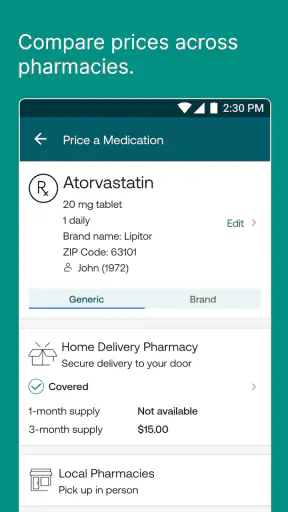
A coverage question is another example. If the price or availability of a medication changes, that may be related to plan rules, the prescription itself, or the pharmacy's inventory. Reinstalling the application cannot alter those factors. The app can still help by giving me a place to review the prescription details and identify what needs clarification.
For urgent health concerns, I would not wait for an app response. Express Scripts is a pharmacy-care management tool, not an emergency service. A severe reaction, dangerous symptom, or immediate medication question belongs with a qualified healthcare professional or emergency service. That boundary is important because convenience can otherwise encourage people to use the wrong channel.
Travel creates another realistic complication. If I were away from home and needed medication quickly, I would use the app to review my prescription information, but I would not assume that digital access alone guarantees immediate fulfillment in a new location. I would confirm the practical details with the relevant pharmacy and allow time for any required coordination.
Who will benefit most from it
I think Express Scripts is a strong fit for people who already receive prescription services through Express Scripts and want to handle routine pharmacy tasks from a phone. It is especially useful for someone who dislikes calling for every status check, a caregiver who has a clear and authorized account arrangement, or a person who wants to review prescription information while away from a computer.
It can also help people who manage recurring medications and prefer a single place to check rather than relying on memory. The real benefit is not that it removes every step; it makes the account side of those steps easier to reach. That can reduce unnecessary calls, provided the user understands when a pharmacy or prescriber still needs to be involved.
I would be more cautious about recommending it to someone looking only for medication alarms, pill identification, symptom advice, or a general health journal. Those needs call for different tools. I would also hesitate if the person's prescriptions are not connected to Express Scripts, because the app's usefulness depends heavily on that relationship.
My practical verdict
After using it as a prescription-management companion, I see Express Scripts as a focused medical app rather than an all-purpose health platform. Its free price removes the main financial barrier, and its broad availability, Everyone rating, and mature release history make it approachable for many users. The current version, 14.0.1, is worth checking against the phone's operating-system requirement before installation.
My recommendation is straightforward: install it if Express Scripts already handles your pharmacy care, set it up before the next urgent refill, and learn which issues belong to the app and which belong to a pharmacy, prescriber, or coverage team. That preparation is more valuable than repeatedly troubleshooting a deadline-day failure.
The best reason to use Express Scripts is control over routine prescription tasks, not the promise of replacing every healthcare conversation. When the account connection is correct, it can make checking and managing pharmacy care more convenient. When the underlying issue is clinical, administrative, or pharmacy-related, the smartest move is to use the app as a guide and contact the right human source. For the audience it serves, that balance makes it a practical download rather than a generic medical utility.


